For conductors · ab|takt for Apple Watch and Wear OS
Eyes on the choir.
The rehearsal at your wrist.
Start and stop the recording from your wrist, mark places with a tap, play the tuning pitch and see what the plan has next – while your eyes stay on the choir. With Apple Watch and with watches running Wear OS.
Not available yet. Each feature says whether it is built or in development: see the programme.
Programme
Part one
Coming soon: built; before release it will be tested on real devices and signed off. We will name a date only at release. In development: designed and partly built already, but not finished; details may change.
One tap, and you’re recording. (Coming soon)
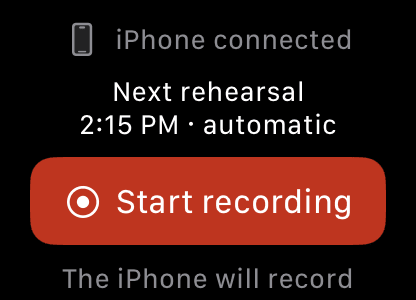
Your watch has one button: “Start recording”. The line below it tells you beforehand which device will record, and once your iPhone confirms, your watch says “iPhone is recording”. To stop, use “Hold to stop” – a stray tap won’t end your rehearsal.
Your iPhone records when ab|takt is open on it or already waiting for a planned rehearsal (see below) – your iPhone doesn’t let any app turn on the microphone from the background. If it can’t right now, your watch says so straight away and tells you the next step. You can stop at any time.
Record automatically
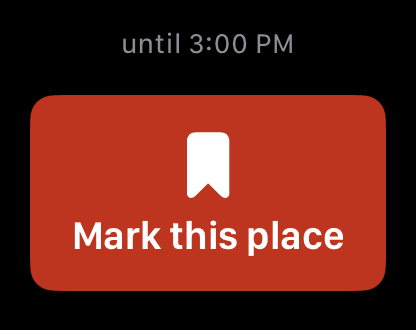
If you like, ab|takt records the rehearsals in your rehearsal plan by itself: open the app in the half hour before the rehearsal and leave it open – at the planned time, recording starts after a short countdown. Your watch shows until when the rehearsal is planned.Note 1
When your iPhone can’t: your watch records itself (In development)
If ab|takt isn’t open on your iPhone right now, your watch is to record the rehearsal itself – with its own microphone. The line below “Start recording” then says “This watch will record”, and the recording goes to your iPhone afterwards. This is built, but stays switched off until it has been tested on real watches.
Your watch can record by itself only while it is also recording your conducting motion (chapter F): only then does a recording on the watch keep running with your wrist lowered. Without that, your iPhone records as before.
The plan suggests. You decide. (In development)
Set up the rehearsal beforehand: pieces from your library or simply a title, plus warm-up, break and minutes. On your phone, your iPad or in your browser – the same plan everywhere.Note 2
During the rehearsal your watch shows what’s on, short and easy to read: “Gloria · Mozart”. ab|takt shortens long titles for this; you can change a piece’s short name yourself. When the time is up, your watch taps once, briefly. Tap “Next” to move on to the next item – or stay as long as your choir needs. You can simply let a tap go by, too.Note 3
If the evening goes another way, rehearse on without times – with one tap on your watch.
Mark it without looking. (Coming soon)
A passage you want to come back to after the rehearsal? Tap “Mark this place”, and your watch sets a marker in the running recording. After the rehearsal you’ll find every marked place in the recording on your iPhone.
On newer models a double tap works too: tap the thumb and index finger of your watch hand together twice, without touching the screen.Note 4 “Mark this place” is on your iPhone, too.
Note what it’s about – or “Just mark” (In development)
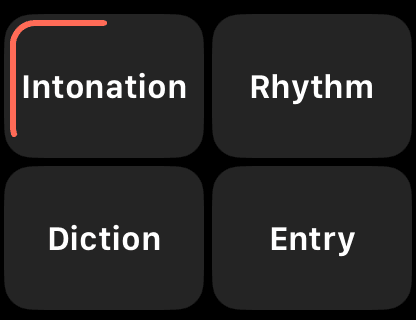
A tap on “Mark this place” sets the marker straight away. Right after that, your watch shows four large tiles with tags, such as intonation, rhythm, diction and entry – or, if you set it up that way, the four voice parts. In the middle sits “Just mark”: one tap, and the place stays without a tag. If you tap nothing, your default applies after six seconds – “Just mark” to begin with; a ring shows how much time is left.Note 5 ↺ takes back a marker set by mistake.
You choose on your iPhone which four tiles appear and what the default is; you can add more tags after the rehearsal. Then you listen back with a purpose – say, every intonation place in the sopranos, sorted by piece. Tags are about voice parts and topics, never about individual singers.
The piano’s A, at your wrist. (Coming soon)
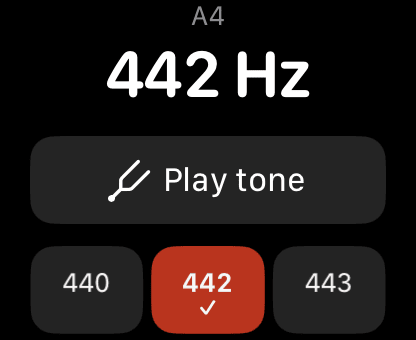
Play the tuning pitch from your watch (“Tuning fork” on the screen): A = 440, 442 or 443 Hz, other tunings – or your own.Note 6 If there is a piano in the room, play an A: with “Take from the piano”, ab|takt listens briefly on your iPhone and takes over the instrument’s pitch. Your iPhone listens only while that screen is open, and stores nothing.
The tuning pitch also works without a watch, on iPhone and iPad.
From the piano – on your watch, too (In development)
Your watch can listen, too: on its tuning fork page, “Take from the piano” opens a page of its own. Your watch listens with its microphone only while that page is open, detects the note the way your iPhone does, and stores nothing; the pitch it takes over then applies on the watch. This works between recordings. Like recording with the watch, it is built but still switched off.
Don’t hear it. Feel it. (In development)
Before the choir comes in, tap “Count in”: after one silent beat, your watch gives you one bar at the piece’s tempo as gentle taps on your wrist – felt rather than heard, just for you. Then it goes still, and you give the upbeat.
You set the tempo on your iPhone in beats per minute, or simply tap it in. On your watch you change it with the crown or by tapping, for now; with “Save”, ab|takt keeps it for the piece.Note 7


Your conducting hand – only if you wish. (Coming soon, optional)
If you wish, your watch records the movements of your conducting hand, aligned with the recording – to look at and export. How closely movement and sound line up is measured and shown for every recording. The rehearsal then reads “Conducting motion recorded” in the app and on abtakt.app – visible only to you, never to the choir.
This is a choice of its own, unticked to begin with. Without it, your watch is a remote and a way to mark places, and records no movement. When ab|takt transfers a rehearsal, only a short note goes with it: that movements were recorded, with which hand, for how long, how precise the time alignment is and how much of it was beating time. The motion data itself stays on your iPhone unless you choose to provide it for research in future (see below). ab|takt records neither heart rate nor location; your watch records sound only when it records the rehearsal itself (chapter A).
Conducting motion recorded · right hand · 1:52 h
In the settings, unticked to begin with:
Record the movements of my conducting hand
Two separate choices. Both optional.
Provide for research (In development)
After the rehearsal: your motion profile (In development)
From the motion data, ab|takt works out a motion profile of the rehearsal on your iPhone: the tempo your hand mostly beat (say, “Mostly around 72 and 108 beats per minute”), when in the rehearsal you were beating time, making expressive gestures or keeping your hand still, and, if you like, how the tempo changed. Tapping a marked place in the timeline plays the recording from there.
The numbers count the beats of your hand. The profile is an overview for you, not an assessment, and it stays on your iPhone. It is built already and is still being tested in real rehearsals.
Separately: research (In development)
How a choir follows a gesture has hardly been measured in real rehearsals. We plan to research this – only with your separate, voluntary consent: under a research ID instead of your name, stored in the EU, for the ab|takt team only, never passed on, and you can withdraw at any time. Movements can identify a person, so we always treat them as personal data. What the research will find is open; we cannot promise you a personal benefit. We will report back to you what we learn.
With Wear OS, too. (In development)
ab|takt is coming to watches running Wear OS, together with the app on your phone: starting and stopping the recording, marking places (with tags or “Just mark”), the rehearsal plan with its short tap and, if you wish, recording your conducting hand. Three things are different.
Topic | The same | Different with Wear OS |
|---|---|---|
Mark this place | The same: One tap on “Mark this place”, then tags or “Just mark”. | Different: No double tap – you tap the screen. |
Buttons | The same: Start with one tap, stop with “Hold to stop”. | Different: If your watch has a button you can assign, it can mark a place, if you like. |
While recording | The same: Mark, Programme and Controls as pages side by side. | Different: The recording screen stays visible, even when your watch dims it – no jump to the watch face. |
Notes
- Switched on per rehearsal series, off to begin with. ab|takt reminds you 15 minutes before the rehearsal. After the planned end, ab|takt keeps recording until it has been quiet for a while – without you doing anything, for at most one more hour. ↩ Back to the text
- The plan is kept in your account so that all your devices show it; nobody else sees it. Without a watch you see the plan on your phone; nothing vibrates or rings there. ↩ Back to the text
- The tap usually comes at the planned minute; without a connection to your phone it can come later or not at all. At most one tap per item, never repeated. Your watch’s Focus and silent settings still apply. On your phone you can turn the taps off altogether (“Feel the rehearsal plan”). ↩ Back to the text
- Double tap from Apple Watch Series 9, Apple Watch SE 3 and Apple Watch Ultra 2 with watchOS 11. Tapping the screen always works. ↩ Back to the text
- With VoiceOver or Switch Control no time runs out; “Done” then works like the end of the six seconds. With Reduce Motion on, the ring shows the seconds in steps. ↩ Back to the text
- Apple Watch Series 10, Apple Watch SE 3 and Apple Watch Ultra 2 play the tone through the watch speaker. On other models your iPhone plays it – except while it is recording. ↩ Back to the text
- Your watch counts in only before the entry, not while the choir sings. Your watch’s haptics need to be on. ↩ Back to the text
- Features and illustrations may change before release. The app screens in the illustrations are redrawn; dashed screens are drafts. Times, pieces and places are an example. The screens at the end of the page come from the app in the simulator, with sample data.
Good to know.
- What you need. With Apple Watch: ab|takt on your iPhone, set up as a conductor, and Apple Watch Series 4 or later, Apple Watch SE or Apple Watch Ultra with watchOS 10 or later. Your watch works together with your iPhone; the tuning pitch is on iPad, too.
- With Wear OS. ab|takt as an app on your phone, set up as a conductor, and a watch with Wear OS 5 or later, connected to that phone.
- Your choir. Your watch records only your own movement. For the recording, the usual rule applies: tell your choir first and get their consent. Text for your choir
- Your data. Motion data only with your consent. Your rehearsal plan is kept in your account so that all your devices show it. Delete and export at any time in the app. More in the privacy policy.
- 18 and over. ab|takt is for adults 18 and over. If anyone under 18 is in the rehearsal, there is no recording.
- Trademarks. Apple, Apple Watch, Apple Watch SE, Apple Watch Ultra, iPhone, iPad and watchOS are trademarks of Apple Inc., registered in the U.S. and other countries. Wear OS is a trademark of Google LLC.
Already today: what you say ends up in your score.
The watch is the next step. Recording, listening back and finding your remarks in the score – ab|takt does that today, in your browser or as an app.
See an exampleTry it in your browser
Already today: your remark in the score
 StartComing soon
 MarkComing soon
 Tuning forkComing soon
 TagsIn development
Questions or wishes for ab|takt on your watch? Write to us: hello@abtakt.com