What you say
ends up in the score.

One phone on your music stand – and what you say in rehearsal appears afterwards at the right place in your score. In your own words.

Currently free, data in the EU, your recording never goes to external AI services, 18+

What a remark sounds like.

Vivaldi, Gloria: Propter magnam gloriam, bars 5 to 6 Four choir parts. Above the sopranos’ first entry, in pencil: ‘Konsonant voraus’; an arrow points to the first note.

Vivaldi, Gloria – V. Propter magnam gloriam, bars 5–6. Kalmus (1967), scan IMSLP-EU, public domain.

Read the remark (German original, with English translation)

„Denkt dran, dass eure Vokale auf Zeit beginnen und nicht die Konsonanten. Wenn die Tenöre ‚Domine Fili‘ machen, höre ich das D exakt auf der Eins – ich muss es vor der Eins hören, weil ich das O auf der Eins hören muss. Da muss man sich trauen, denn sobald man versucht zu hören, bist du garantiert zu spät. Also grundsätzlich immer die Konsonanten vor der Zeit, wenn es losgeht.“

Translation: “Remember that your vowels should begin on the beat, not your consonants. When the tenors sing ‘Domine Fili’, I hear the D exactly on beat one. I need to hear it before beat one, because the O needs to be on the beat. You have to dare to do it: once you try to listen first, you will be late. So always put the consonants before the beat when you start.”

See a whole example: Bach, “Fürchte dich nicht”

Your next rehearsal, in the score.

In the browser or as an app. Your singers don’t need anything.

  1. Record

    Put a phone on your music stand and record the rehearsal (“Record a rehearsal”). A recording you already have works too (“Use an existing recording”).

  2. Add the score

    Upload the pages you rehearsed from your edition as a PDF. A flat scan of your paper score is enough; you don’t need a digital edition. You choose which works you rehearsed when you transfer (“What did you rehearse?”); scores can also be added afterwards.

  3. Transfer

    Tap “Transfer to score”; the first time, you sign in for it (email code, 18 and over). Keep ab|takt open until the recording has been uploaded; after that you can close it, and next time you open it you’ll see how far processing has got.

  4. Read

    The remarks appear where they belong – in your words, with the audio clip from the rehearsal.

  5. Pass it on

    Send the remarks as text to your choir’s group chat (“Share rehearsal notes”) or print the marked score. Your singers need nothing for this. You can also share selected remarks with their audio clips directly with your choir; members need an account for that.

First: tell the choir.

Whoever records tells the choir beforehand and asks for their consent, for example once at the start of the season. Anyone who doesn’t want to be recorded says so – and then there is no recording. Adults only: if anyone under 18 is in the rehearsal, there is no recording. More in the privacy policy and in the text for your choir.

Start small.

You don’t have to record the whole choir straight away: start with a sectional with the singers who agree – or with a single project.

Pronunciation and meaning, right in your score.

A good first step before you record a rehearsal.

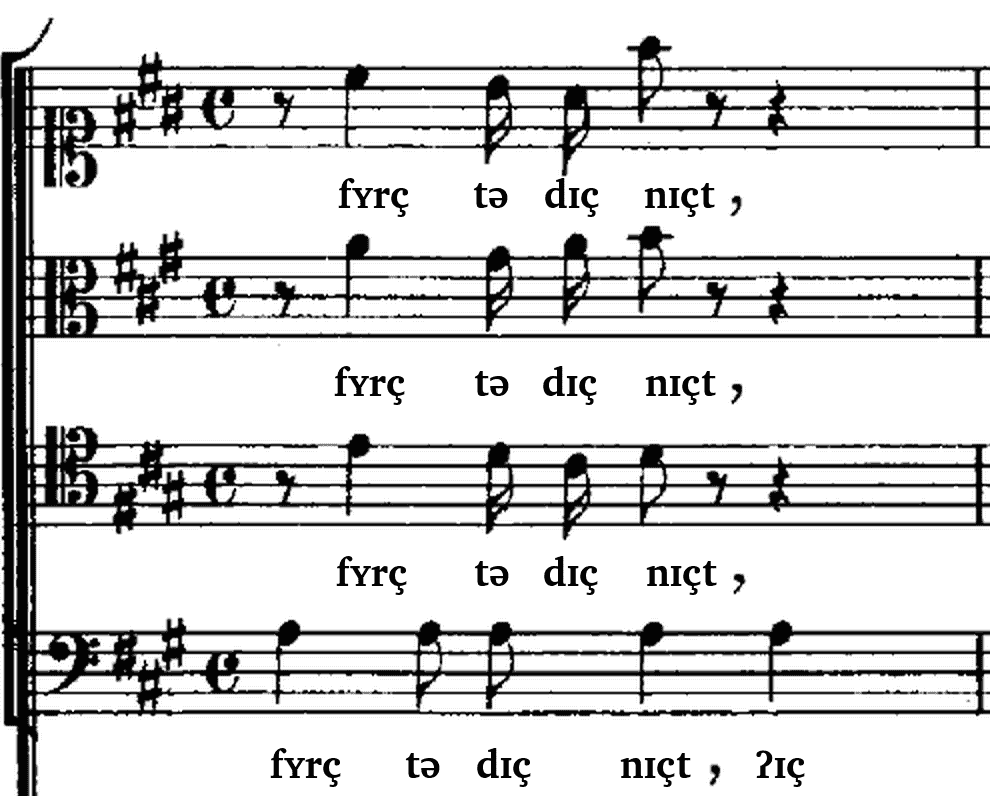
Send just the score, without a rehearsal: add the score as a PDF in the web app, then tap “Prepare the score”. For recognised works, your score then shows the pronunciation of every syllable in phonetic script (IPA), from Latin to dialect, plus the meaning of the words. For other works you get the pronunciation if ab|takt can read the lyrics from the pages.

Score excerpt in four parts. Under each part, the phonetic transcription replaces the printed words: fʏrç tə dɪç nɪçt.
Bach, “Fürchte dich nicht”, bar 1 – how ab|takt shows the pronunciation. Bach-Gesellschaft edition (1892), public domain.

See the pronunciation in the Bach example – switch on “IPA above the notes” at the top.

What ab|takt can’t do yet.

So you don’t find out in the middle of a rehearsal.

A text for your choir.

So your choir knows what is recorded before you record. Copy it, fill in the date and send it to your choir’s group chat, or read it out. The full information, with a consent to sign, is our text for the choir to print.

Dear singers,

from [date] I’d like to record our rehearsals with ab|takt. ab|takt transcribes what I say in rehearsal and afterwards shows my remarks at the right place in the score. The recording is stored and analysed in the EU. The recording itself never goes to AI services; only its transcript, as text, goes to AI services in the EU. ab|takt does not assess anyone individually.

I’ll send you the remarks as text or on paper. If I share remarks in our choir in ab|takt, you’ll also hear short clips from the rehearsal there, never the whole recording.

If you don’t want to be recorded, tell me – and I won’t record. You can withdraw your consent at any time, with me or at datenschutz@abtakt.com. I don’t record rehearsals with anyone under 18.

More: abtakt.com/en/privacy

Costs and data.

Currently free, with monthly limits: 8 rehearsal recordings and 60 score files per account and month. You can view the example and record without an account. To transfer, you sign in – with an email code, no password, 18 and over. Your results are then on all your devices, also after a new phone or browser, and you can create a choir and share remarks with it.

Recordings and scores are stored and processed in the EU. AI service providers in the EU receive only text and images of individual score pages: to recognise title, composer, movements and voices and, if the lyrics are missing, to read them from the pages. The recording never goes to them. Without your separate consent we don’t use your recordings to train AI models, and we don’t use tracking. You delete recordings on your device in the app; anything already transferred also in the app, under Settings → Data on our servers → “Delete all my data”, or we delete it when you email datenschutz@abtakt.com. Privacy policy

Already using a choir app for dates and scores? ab|takt doesn’t replace it: the marked score goes into any app that opens PDFs, the remarks into any chat.
Try it with your choir.

We support the first choirs personally: with an introductory call of about 20 minutes, a direct phone number and an open ear for what ab|takt should do next. A project with a clear start and end works best, around 4 to 10 rehearsals.

Write to us or call. You can try ab|takt right now, in your browser.

The app for iPhone, iPad and Android keeps recording with the screen locked. ab|takt also works in the browser: abtakt.app.

Prefer to talk?

Call me if you like.

Vladimir Viro, ab|takt
+49 821 99980097
hello@abtakt.com

Pass it on to the board.

Deutsch: abtakt.com/chorcom/leitung